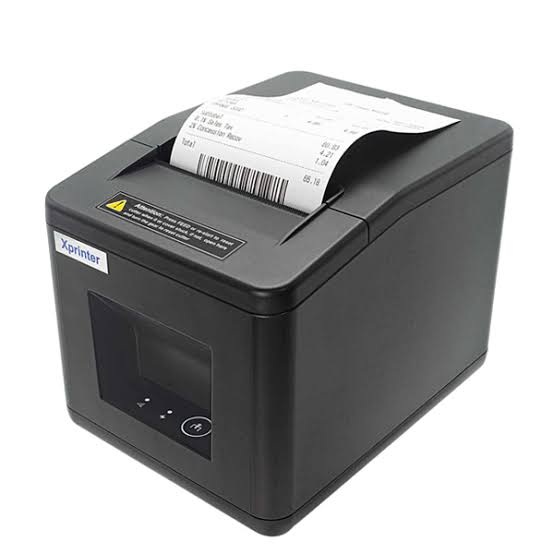

Receipt printing technology continues to evolve as businesses adopt more advanced point-of-sale (POS) systems and look for faster, more convenient ways to manage transactions. Retail stores, restaurants, supermarkets, and service providers increasingly need printing equipment that combines reliable performance, flexible connectivity, and straightforward integration with business software.
An Xprinter Receipt Printer can support these requirements through features designed for everyday transaction printing. Depending on the model, available capabilities may include thermal printing, multiple connection interfaces, barcode support, automatic paper cutting, and compatibility with different POS configurations. Understanding these developments helps businesses identify useful features when upgrading their checkout equipment.
1. Improved Thermal Printing Performance
Thermal printing remains an important technology in modern receipt printers. Instead of using ink cartridges or toner, thermal devices apply heat to specially coated paper to produce text and images.
Developments in printing components and device design aim to improve printing consistency, speed, and operational efficiency. These capabilities are particularly valuable in supermarkets, convenience stores, and restaurants where employees process frequent transactions.
Thermal printers also generally operate more quietly than impact printers and require fewer ink-related consumables. However, businesses must use compatible thermal paper to maintain suitable print quality.
2. More Flexible Connectivity Options
Modern POS environments include desktop computers, dedicated terminals, tablets, and mobile devices. As a result, connectivity has become an important consideration when selecting receipt-printing equipment.
Depending on the model, Xprinter receipt printers may offer different interfaces, including:
- USB: Supports direct connections with compatible computers and POS terminals.
- Ethernet: Allows integration into suitable wired business networks.
- Bluetooth: Enables wireless connections with supported mobile devices.
- Wi-Fi: Provides wireless network connectivity on compatible models.
- Serial: Supports certain traditional POS configurations.
These options allow businesses to choose a printer that fits their existing equipment and workstation layout.
3. Compact Designs for Modern Workspaces
Checkout counters often contain several devices, including barcode scanners, cash drawers, payment terminals, and POS computers. Compact printer designs help businesses organize this equipment without using excessive counter space.
Smaller receipt printers can be useful for cafés, convenience stores, mobile service counters, and businesses with limited working areas.
Practical design improvements may also focus on easier paper loading, accessible controls, and convenient maintenance. When comparing models, businesses should consider the printer’s dimensions and the space required to replace paper rolls.
4. Better POS Software Integration
A receipt printer must communicate effectively with the software responsible for processing transactions. Modern POS systems often manage billing, inventory, customer information, and payment records through connected applications.
Printer compatibility therefore plays an important role in equipment selection. Businesses should check supported operating systems, available drivers, printer command languages, and application requirements.
Reliable integration allows transaction details to move from the POS system to the printer without requiring employees to enter the same information manually. This supports consistent receipt formatting and helps reduce avoidable printing errors.
5. Higher Printing Speeds and Intelligent Paper Handling
Printing speed is particularly important for businesses that process large numbers of orders. Some current Xprinter thermal receipt printer models advertise speeds of up to 300 mm per second, depending on the model and printing conditions. <Cite refs={[“turn781046search0″,”turn781046search1”]}/>
Other useful developments include automatic paper cutting, anti-jam cutter mechanisms, paper-out detection, and adjustable paper positioning. These features can reduce manual work and help maintain consistent printing during busy periods.
For example, certain models in the 80mm series include automatic cutter protection and paper detection functions. <Cite refs={[“turn781046search0”]}/>
6. Portable Printing for Mobile Businesses
Portable receipt printers are becoming useful for businesses that do not operate from a fixed checkout counter. Delivery services, outdoor vendors, mobile sales teams, and hospitality staff may need to print transaction records while moving between locations.
Some newer portable models offer Bluetooth connectivity, rechargeable batteries, and compatibility with smartphones and tablets.
For example, the XP-P802A supports 58mm and 80mm paper rolls, USB and Bluetooth connections, and Windows, Android, iOS, and Linux systems. Its compact design makes it suitable for selected mobile retail and hospitality applications. <Cite refs={[“turn781046search2″,”turn781046search5”]}/>
7. Barcode and QR Code Printing
Barcode and QR code printing has become an important feature in modern business transactions. These codes can connect printed receipts with digital services, product information, loyalty programs, and promotional campaigns.
Depending on the model, Xprinter receipt printers support different one-dimensional and two-dimensional barcode formats. Some devices also support QR codes and PDF417 printing.
These capabilities can help businesses create more informative receipts and integrate printed documents with compatible inventory or customer-management systems. <Cite refs={[“turn781046search1″,”turn781046search6”]}/>
8. Improved Device Monitoring and Maintenance
Printer monitoring features help employees identify operational problems before they cause extended interruptions. Depending on the model, these functions may include paper detection, temperature monitoring, error alerts, and status indicators.
Some devices also support firmware updates, allowing compatible printer software to be updated without replacing the hardware. For example, certain models in Xprinter’s product range include online firmware update capabilities and printer-status monitoring functions. <Cite refs={[“turn781046search0″,”turn781046search3”]}/>
These developments can make routine maintenance more manageable, especially for businesses operating several printers across different locations.
9. Cloud Printing and Connected Business Operations
Cloud-based printing is another area of development in commercial printing technology. Instead of relying exclusively on a direct connection to a local computer, compatible cloud printing systems can receive printing requests through network-based services.
This approach can be useful for businesses managing orders from online stores, delivery platforms, or multiple sales channels.
Xprinter’s product portfolio includes cloud receipt printing solutions designed for connected commercial applications. The XP-T895H, for example, is presented as a cloud receipt printer supporting automatic multi-platform order receiving and different paper widths. <Cite refs={[“turn781046search4″,”turn781046search7”]}/>
Businesses considering cloud printing should check platform compatibility, network requirements, data security, and the configuration needed for their existing POS software.
10. Expanded Product Choices for Different Industries
Another important development is the availability of printers designed for more specialized working environments. Rather than using the same device for every application, businesses can select equipment according to their printing requirements.
Examples include:
- Retail stores: Compact desktop printers for customer receipts and payment records.
- Restaurants: Kitchen printers with audible and visual alerts on selected models.
- Supermarkets: Printers with larger paper compartments and automatic cutting features.
- Delivery businesses: Portable Bluetooth printers for mobile transactions.
- Warehousing and logistics: Specialized label and barcode printers for product identification and tracking.
Xprinter’s product range includes desktop, portable, kitchen, embedded, cloud, and specialized printing solutions. <Cite refs={[“turn781046search0″,”turn781046search2″,”turn781046search7”]}/>
11. What Businesses Should Consider Before Upgrading
New features can improve business operations, but purchasing decisions should be based on practical requirements rather than specifications alone.
Before selecting a newer receipt printer, businesses should evaluate:
- Printing speed: Determine whether the device can handle the expected transaction volume.
- Connectivity: Check whether USB, Ethernet, Bluetooth, or Wi-Fi is required.
- Paper compatibility: Confirm supported paper widths and roll dimensions.
- Software integration: Verify operating system, driver, and POS application compatibility.
- Special features: Decide whether automatic cutting, barcode printing, or cloud connectivity is necessary.
- Maintenance: Review cleaning requirements, firmware support, and replacement component availability.
Xprinter also provides a download section with drivers, software development kits, testing utilities, and user manuals for supported receipt printer models. These resources can help businesses with installation and technical configuration. <Cite refs={[“turn781046search3”]}/>
Conclusion
Receipt printer technology is developing through improvements in printing speed, connectivity, portability, paper handling, barcode support, and software integration. These features help businesses adapt their printing equipment to changing retail, hospitality, logistics, and service requirements.
Xprinter’s expanding range includes solutions for both traditional checkout counters and more specialized connected environments. However, available functions differ between models, so businesses should compare technical specifications and confirm compatibility before purchasing. Choosing equipment based on actual operational needs can help maintain efficient transactions and dependable printing performance.