
Efficient warehouse and inventory management depend on accurate product identification, organized stock records, and reliable tracking processes. Businesses handling large quantities of goods need practical ways to label products, monitor stock movement, organize storage locations, and prepare shipments. Printing technology plays an important role in these activities by converting inventory information into readable labels and barcodes that employees can use throughout the supply chain.
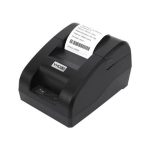
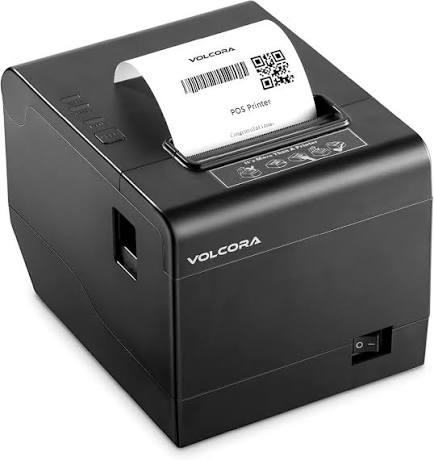
A Thermal Printer provides a convenient solution for producing barcode labels, product identification tags, shipping labels, and other warehouse documents. By working with inventory management software and barcode scanning systems, thermal printing technology helps businesses improve product traceability, reduce manual data entry, and maintain more organized warehouse operations.
1. Improving Product Identification
Product identification is one of the basic requirements of effective inventory management. Warehouses often handle different product categories, sizes, models, and batches. Without clear identification, employees may struggle to locate the correct items or distinguish between similar products.
Thermal printers can produce labels containing essential product information, such as:
- Product names and identification numbers
- SKU and model numbers
- Barcodes and QR codes
- Batch and lot numbers
- Manufacturing and expiration dates
- Storage and handling instructions
These labels help employees recognize products quickly during receiving, storage, picking, and dispatch operations. Standardized labeling also reduces confusion when inventory moves between departments or facilities.
2. Supporting Barcode-Based Inventory Tracking
Barcode systems are widely used in warehouses because they make product tracking faster and more consistent. Each barcode represents specific information that can be retrieved through a compatible scanning device and inventory management system.
Thermal printers produce barcode labels that can be attached to products, cartons, pallets, and storage locations. Employees can scan these labels to record stock movements and update inventory information.
A typical barcode-based workflow includes:
- Product information is entered into the inventory management system.
- The system generates a barcode containing the required identification data.
- A compatible thermal printer produces the label.
- Employees attach the label to the relevant product or package.
- Warehouse staff scan the barcode during inventory activities.
- The system records the movement or transaction.
This process helps maintain more accurate inventory records and improves visibility across warehouse operations.
3. Increasing Inventory Counting Accuracy
Stock counting is necessary for verifying inventory records and identifying differences between recorded and actual quantities. Manual counting can become time-consuming, especially in facilities with large product ranges.
Barcode labels produced by thermal printers help simplify this process. Employees can scan product identifiers and enter quantities using compatible handheld devices or mobile terminals.
The inventory system can then compare scanned information with existing records. This makes it easier to identify missing items, incorrect quantities, and misplaced stock.
Although barcode technology does not eliminate every counting error, it can reduce dependence on handwritten records and repetitive manual data entry.
4. Improving Warehouse Organization
An organized warehouse allows employees to locate products efficiently and use available storage space more effectively. Thermal printing supports this process by producing labels for shelves, racks, bins, and individual storage locations.
Location labels can include:
- Aisle and rack identifiers
- Shelf and bin numbers
- Storage zone information
- Product category references
- Barcode-based location codes
When employees scan a location label, compatible warehouse software can display the products assigned to that area.
Consistent labeling also helps new employees understand warehouse layouts and follow established storage procedures.
5. Supporting Faster Order Picking
Order picking involves locating and collecting products according to customer orders. It is a major part of warehouse operations and can become inefficient when product locations are unclear.
Thermal-printed product and location labels help employees identify the correct items during picking activities. When integrated with warehouse management software, barcode scanning can guide workers toward the appropriate storage locations and confirm selected products.
This process can help businesses:
- Reduce product identification errors
- Improve picking consistency
- Organize picking routes
- Verify selected quantities
- Support faster order preparation
For warehouses handling frequent online orders, clear labels and reliable scanning processes are particularly valuable.
6. Streamlining Shipping and Dispatch Operations
Shipping departments need accurate package information to prepare orders for transportation. Labels typically contain details such as tracking numbers, destination addresses, carrier information, and barcode identifiers.
Thermal printers are commonly used to produce shipping labels because they can generate clear output suitable for automated scanning systems.
A typical dispatch process may involve printing a shipping label directly from an order management or logistics platform. Employees then attach the label to the package before it moves to the appropriate dispatch area.
Accurate labeling helps carriers identify packages and scan them at different stages of transportation. It also reduces the likelihood of delays caused by unclear or incorrect shipping information.
7. Supporting Batch and Lot Tracking
Many industries need to monitor products according to manufacturing batches or production lots. This is particularly important in food distribution, pharmaceuticals, cosmetics, chemicals, and other regulated or traceability-sensitive sectors.
Thermal printers can produce labels containing batch numbers, production dates, expiration dates, and other relevant identifiers.
When these labels are connected to inventory software, businesses can record where specific batches are stored and when they move through the supply chain.
Batch tracking can support:
- Product traceability
- Stock rotation
- Expiration monitoring
- Quality control procedures
- Product recall investigations
For sensitive applications, businesses must ensure that the selected printer, label material, and software meet relevant industry and regulatory requirements.
8. Enabling First-In, First-Out Inventory Management
First-In, First-Out (FIFO) is an inventory management method in which older stock is used or dispatched before newer stock. It is commonly applied to products with limited shelf lives or changing inventory conditions.
Thermal labels can display receiving dates, batch information, and expiration dates to help warehouse employees identify older inventory.
When combined with inventory management software, these labels support more consistent stock rotation procedures.
For example, a food distribution warehouse can use date-based labels to help employees identify products that should be dispatched first. Clear identification reduces the risk of overlooking older stock during picking activities.
9. Reducing Manual Data Entry
Handwritten inventory records can create problems when information is unclear, incomplete, or entered incorrectly. Repeated manual data entry also consumes employee time.
Thermal printing supports barcode-based workflows that allow employees to retrieve product information through scanning rather than typing every identifier manually.
When integrated with compatible warehouse software, scanning can automatically retrieve details such as product descriptions, stock quantities, and storage locations.
This reduces repetitive administrative tasks and helps maintain consistent records across different warehouse activities.
10. Supporting Different Warehouse Environments
Warehouses vary in size, operating conditions, and inventory requirements. Thermal printing technology is available in different configurations to support these environments.
Small Warehouses
Compact desktop label printers can support basic product identification, stock labeling, and shipping activities.
Large Distribution Centers
Industrial-grade label printers may be more suitable for high-volume environments where employees print labels throughout the day.
E-Commerce Fulfillment Facilities
Shipping label printers help generate package identifiers and tracking information for frequent customer orders.
Manufacturing Warehouses
Thermal transfer printers can produce durable product and equipment labels when suitable ribbons and materials are selected.
Choosing the appropriate printer type helps ensure that the equipment can handle the required workload and operating conditions.
11. Choosing Between Direct Thermal and Thermal Transfer Printing
Both direct thermal and thermal transfer technologies are used in warehouse labeling, but they serve different requirements.
Direct thermal printing uses heat-sensitive media and does not require a ribbon. It is often suitable for shipping labels, temporary identification, and other applications where labels do not need to remain readable for extended periods.
Thermal transfer printing uses a ribbon to transfer ink onto compatible label materials. Depending on the media and ribbon combination, it can provide greater resistance to abrasion, moisture, and environmental exposure.
| Factor | Direct thermal | Thermal transfer |
|---|---|---|
| Ribbon requirement | No | Yes |
| Media | Heat-sensitive labels | Compatible paper or synthetic labels |
| Durability | Generally more sensitive to heat and light | Can offer longer-lasting output |
| Common uses | Shipping and temporary labels | Product, asset, and industrial labels |
| Consumables | Labels or thermal media | Labels and ribbons |
The best choice depends on how long labels must remain readable, the conditions they will encounter, and the overall printing budget.
12. Improving Inventory Visibility Across Multiple Locations
Businesses operating several warehouses or distribution centers need consistent inventory information across different facilities. Standardized labels can help employees identify products and storage locations using the same identification system.
When thermal printers are connected to centralized inventory software, businesses can generate labels using consistent product information and coding formats.
This supports more organized stock transfers, receiving procedures, and dispatch activities.
For example, a company moving products between regional warehouses can use standardized barcode labels to maintain consistent identification throughout the transfer process.
13. Supporting Real-Time Inventory Management
Real-time inventory management depends on timely updates whenever products are received, moved, picked, or dispatched. Thermal-printed barcode labels provide the identifiers needed for scanning and recording these activities.
When integrated with compatible warehouse management systems, scanning a product or location barcode can update inventory records according to the configured workflow.
This can help managers monitor stock movement, identify inventory discrepancies, and make more informed replenishment decisions.
However, real-time accuracy also depends on correct scanning procedures, reliable software, network availability, and employee training.
14. Choosing the Right Thermal Printer for Warehouse Operations
Selecting suitable equipment requires evaluating the warehouse’s workload, label requirements, and operating environment.
Important considerations include:
- Printing volume: Determine how many labels the warehouse needs to produce daily.
- Print resolution: Choose a resolution that supports readable text and scannable barcodes.
- Printing speed: Consider how quickly labels must be produced during receiving and dispatch operations.
- Media compatibility: Check supported label widths, materials, roll sizes, and thicknesses.
- Connectivity: Review USB, Ethernet, Wi-Fi, Bluetooth, or other supported interfaces.
- Durability: Select equipment appropriate for the warehouse environment and expected workload.
- Software integration: Confirm compatibility with warehouse and inventory management applications.
- Maintenance and support: Review printhead life, replacement parts, warranty coverage, and technical assistance.
Testing sample labels with the warehouse’s actual scanners and software can help identify compatibility issues before purchasing equipment in larger quantities.
15. The Importance of Label Quality and Maintenance
Even a suitable printer may produce unreliable results if businesses use poor-quality media or neglect routine maintenance. Barcode labels must remain readable enough for scanning throughout their intended use.
Warehouse managers should use compatible labels and ribbons, where applicable, and follow the manufacturer’s cleaning recommendations.
Regular maintenance should include printhead cleaning, inspection of rollers and sensors, and checks for paper or label feeding problems.
It is also important to consider the storage environment. Labels exposed to excessive heat, sunlight, moisture, or friction may become damaged or difficult to scan. Selecting appropriate materials helps maintain identification quality throughout the product’s storage and movement.
Conclusion
Thermal printers play an important role in modern warehouse and inventory management by supporting product identification, barcode tracking, stock counting, order picking, and shipping operations. When connected to compatible inventory software and scanning equipment, they help businesses organize product information and reduce reliance on manual data entry.
The right printing technology depends on label durability, printing volume, media requirements, and warehouse conditions. By selecting suitable equipment and maintaining consistent labeling procedures, businesses can improve inventory accuracy, strengthen product traceability, and create more efficient warehouse workflows.